Every unit counted. Every move recorded.
A double-entry stock ledger, a live warehouse map and LPN tracking from receipt to dispatch, so your team and your customers always see the same number.
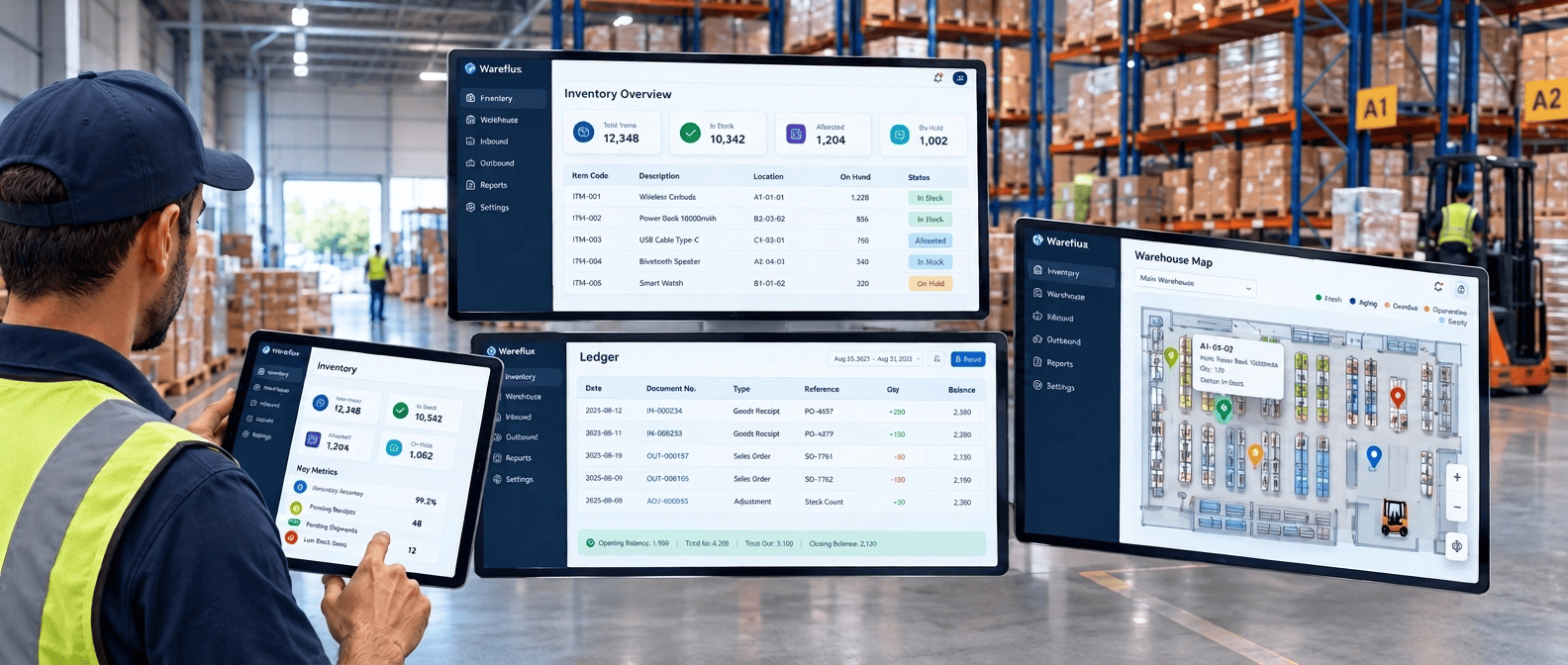
Four stock states, one calculation.
Each figure is read from the ledger when you ask for it. Nothing sits in a separate counter waiting to drift.
-

On hand
The net balance across every storage location in the warehouse.
-

Quarantined
Held for inspection. Released only by approval, disposal or return to the customer.
-

Allocated
Reserved for open outbound orders until they ship or are cancelled.
-

Available
The only quantity that can be promised to a new order or shown in the customer portal.
Four rules the ledger never breaks.
These checks run in the application, the database and the build pipeline. A stock record that fails any of them is never saved.
-
Every entry balances
Each movement writes one debit and one credit that sum to zero. The save is rejected if they do not match.
-
History is permanent
Ledger rows are never edited or deleted. A correction posts a new offsetting pair, keeping the full audit trail intact.
-

Stored in base units
Pallets, cases and inners convert to base units once, at entry. Screens show the pack level your team received in.
-

Checked every 15 minutes
A trial balance confirms each product's entries still net to zero across the whole warehouse, around the clock.
Virtual accounts for stock outside your bins.
When goods arrive from a supplier or leave for disposal, a virtual account completes the entry. You can trace where every unit came from and where it went.
-
1
External Supplier
Goods are received, or returned to the supplier.
-
2
External Customer
Orders are dispatched, or customers return goods.
-
3
Expired Goods Void
Expired stock is written off.
-
4
Disposal Void
Quarantined stock is approved for disposal.
-
5
Adjustment Surplus
A cycle count finds more than expected.
-
6
Adjustment Deficit
A cycle count finds less than expected.
-
7
System Suspense
An LPN is split. This account must net to zero.
-
8
Opening Balance Input
Legacy stock is imported at go-live.
Three everyday operations built on these accounts
-
Bin transfer
Move an LPN to another bin. The put-away engine suggests destinations that match size and temperature rules.
-

LPN split
Break a pallet into cases in one step. SystemSuspense links both sides so the totals always reconcile.
-

Opening balance import
Upload current stock as a CSV at go-live. Any row error rolls back the whole batch, so nothing half-loads.
Your warehouse floor, live in the browser.
After every stock movement, SignalR sends the changed bins to every open map. Supervisors see put-aways and picks land without refreshing.
Select a bin to see its contents.
-
Six-level location tree
Site, area, zone, aisle, rack and bin. Areas are typed as storage, receiving, quarantine, staging or dispatch.
-

Aging and occupancy views
Switch between stock age and fill level. Quarantine and blocked bins always show on top.
-
Temperature zones
Set a min and max temperature per zone. Put-away blocks any product that does not fit the range.
-

Bin detail drawer
Click a bin to see its LPNs and full movement history. Field staff get the same view by scanning the bin on mobile.
-
Count from the map
Flag any bin to create a blind cycle count for that location in one click.
-

Updates without refresh
Every scan on the floor appears on every open map within seconds.
LPN tracking and contract-based picking.
Every pallet, case and unit carries a licence plate number from receipt to dispatch. Each customer contract sets how its stock is picked.
One LPN, every level
Split a pallet and each child LPN keeps its parent's batch, expiry and history.
- Pallet
- Case
- Inner
- Unit
- Full movement historyEvery receipt, transfer, pick and adjustment, in order, from the console or the mobile app.
- Batch and expiry on every LPNBatch number, manufacture date and expiry date are captured at receiving and drive allocation order.
- Base-unit quantitiesStock is stored in base units and shown at the pack level it was received in.
- ZPL and PDF labelsPrint at receiving or reprint any time, straight to a network printer with no driver install.
Picking strategies
Chosen per customer contract. Wave picking applies it automatically at allocation.
-
FEFO
First expired, first out Default
Ships the earliest expiry first. Suited to food, pharma and other perishables, and cuts expiry write-offs.
-
FIFO
First in, first out
Ships in order of GRN date. Suited to electronics, spare parts and raw materials with no expiry.
-
LEFO
Last expired, first out
Ships the latest expiry first, for customers who need maximum shelf life on delivery, such as export orders.